Checkmarx
What is Checkmarx?
Checkmarx enables you to run a series of scanners on each of your projects, each identifying risks affecting different aspects of your software development and deployment.
Checkmarx's core functionalities, such as integration with CI/CD and IDEs, Policy configuration, Triaging results etc. are available across scanners. The platform is designed for the cloud development generation and is delivered from the cloud. It seamlessly secures your entire codebase, enabling you to deliver and deploy more secure code.
Service-Now Ticket Integration
Weekly scans are performed against all running Stage and Production instances. The scan results are recorded in Checkmarx using the format {appcode}/{repo_name}/{namespace}/runtime. The Critical+High vulnerabilities found from the scans generate AVIT's (Application Vulnerability Item Ticket) in Service-Now. These tickets are assigned to the assignment group listed in CMDB for the respective application.
Pipeline Integration
Scans will be performed each time a pipeline is run. The scan results are recorded in Checkmarx using the format {appcode}/{repo_name}/pipeline. A link to the scan results will be available in the 'Checkmarx' stage within the 'Security' job of the pipeline. This 'Checkmarx' stage will also show you the vulnerabilities found, along with the SLO before the pipeline is blocked. If the SLO is not met, the pipeline will still run, however the production deployment stage of the pipeline will be blocked. Checkmarx blocking is not enabled. It will be enabled at a future date (TBD).
| Severity | Ticket Remediation SLO | Pipeline Blocking SLO |
|---|---|---|
| CRITICAL - ZERO DAY | Immediate | TBD |
| CRITICAL | 15 Days | TBD |
| HIGH | 30 Days | TBD |
| MEDIUM | 90 Days | N/A |
| LOW | 180 Days | N/A |
Custom Repos and Scans
The pipeline integration is enabled for pipeline versions v4.5 and above. Repositories that use our SCALE pipeline will automatically create an associated project in Checkmarx. If you would like to scan a repo that is not managed by our SCALE pipeline, please specify the project name in the format of {appcode}/{repo_name}/manual (see the 'Applications and Projects' section below).
Login
- Navigate to: https://us.ast.checkmarx.net/
- If prompted for the tenant, use 'netapp'
- At the login page, there is no need to fill out the username & password fields. Instead, click the "NetApp SSO" button at the bottom of the login form.
Applications and Projects
Checkmarx uses the terms "Applications" and "Projects". Each application will have its own "Application" in Checkmarx, listed as the 3-letter appcode of the application. Each repository will have its own "Project" in Checkmarx. The Project name will be in the format {appcode}/{repo_name}/*. Within each project, you will see results for multiple scan types (SCA, SAST, Container, etc..).
Viewing scan results
IDE Integration
We have documented here the steps to integrate Checkmarx with Visual Studio Code, but Checkmarx also has plugins for other popular IDEs that you can find at Checkmarx IDE Plugins. Some of the steps below will apply to other IDEs as well, so you might want to continue reading anyways.
Checkmarx IDE for Visual Studio Code
Prerequisites
Before you begin, ensure the following prerequisites are met:
-
VS Code version 1.63.0+
-
Checkmarx One account credentials
-
API keys - You can generate your API keys by following the API Key Generation Guide
Important: The roles (permissions) assigned to an API Key are inherited from the user who is logged in when the API key is generated. Make sure your account has appropriate permissions to run scans by cheking with SCALE Support team
-
Checkmarx project: A Checkmarx project must already exist. If it doesn't, you can create a project manually following these steps:
- Navigate to your application in Checkmarx One
- Click New Project - Manual Scan
- Type the project name as
<3-letter-app_code>/<repo_name> - Click Create
- From the new project, under the Source column, click the Scan icon
- Provide the repository URL, click Fetch Branches, and then enter your API token generated within SCALE
For more details, refer to these resources:
Getting Started
Step 1: Installing the Checkmarx VS Code Extension
-
Open Visual Studio Code
-
Go to the Extensions view by clicking the Extensions icon on the Activity Bar (
Ctrl+Shift+X/Cmd+Shift+Xon macOS) -
Search for Checkmarx in the Extensions marketplace
-
Click Install on the Checkmarx extension provided by Checkmarx Inc
Note: Ensure you have a Checkmarx One account and API token to enable authentication and access to Checkmarx One
Step 2: Configuring the Checkmarx Extension
-
After installation, click on the Checkmarx extension icon and then click on the Open Settings button
-
In the API Key field, enter your Checkmarx One API Key
Note: For more details on configuring your connection, refer to the official documentation
Step 3: Running Scans
-
Import Results: In the Checkmarx panel, click the Checkmarx icon in the left-side navigation. Enter the Scan ID to import the results from Checkmarx One
-
Running a New Scan: Select the existing Checkmarx project and branch. Hover over the Checkmarx One Results panel and click the "Run Scan" button to initiate a new scan
-
Viewing Results: After the scan completes, a dialog will appear asking if you'd like to load the results. Click Yes to view them in the Checkmarx panel
-
Viewing Vulnerabilities: Click on individual vulnerabilities to view detailed information and suggested remediation
For more detailed instructions, refer to the Checkmarx One IDE Plugins documentation
False-Positives
If a finding is a false positive, members of ng-ngdc-{appcode}-dev have the ability to update the finding as "Propose Not Exploitable". A note in the form might be required before saving the change. A member of ng-ngdc-{appcode}-leads have the ability to mark findings as "Not Exploitable". Once a vulnerability of a '*/pipeline' project is marked Not Exploitable, the pipeline will ignore it. Once a vulnerability of a '*/runtime' project is marked Not Exploitable, the Service-Now ticket will close the following day and ignore it.
Note: To mark a 'false positive', please set the state to 'Not Exploitable'.
- Triaging SAST Results
- Triaging SCA Results
- Triaging IaC Security Results
- Triaging Container Security Results
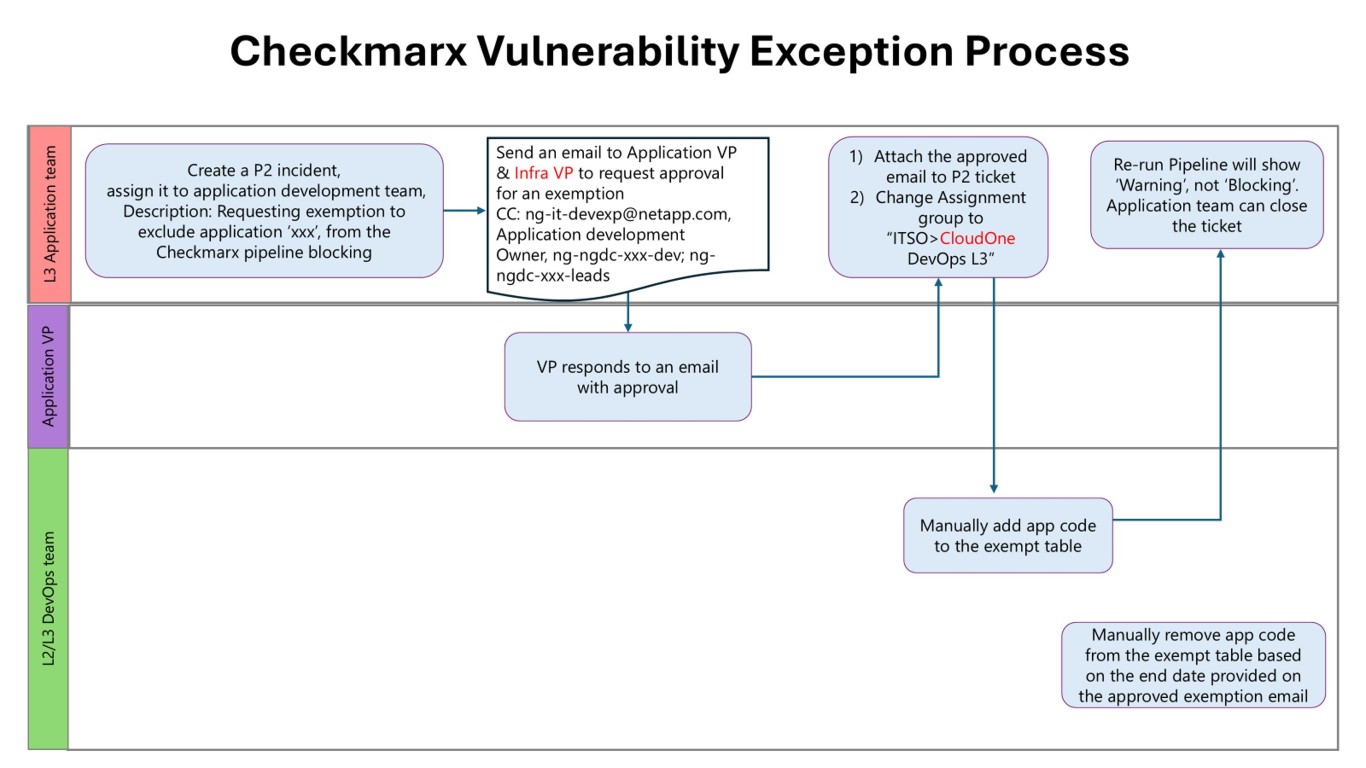
Pipeline Blocking Exception Process
If you are unable to remediate the vulnerability within the SLO, your pipeline will block future production deployments. If you need to file a temporary exception, please follow the process outlined in the following flowchart:
Training Video
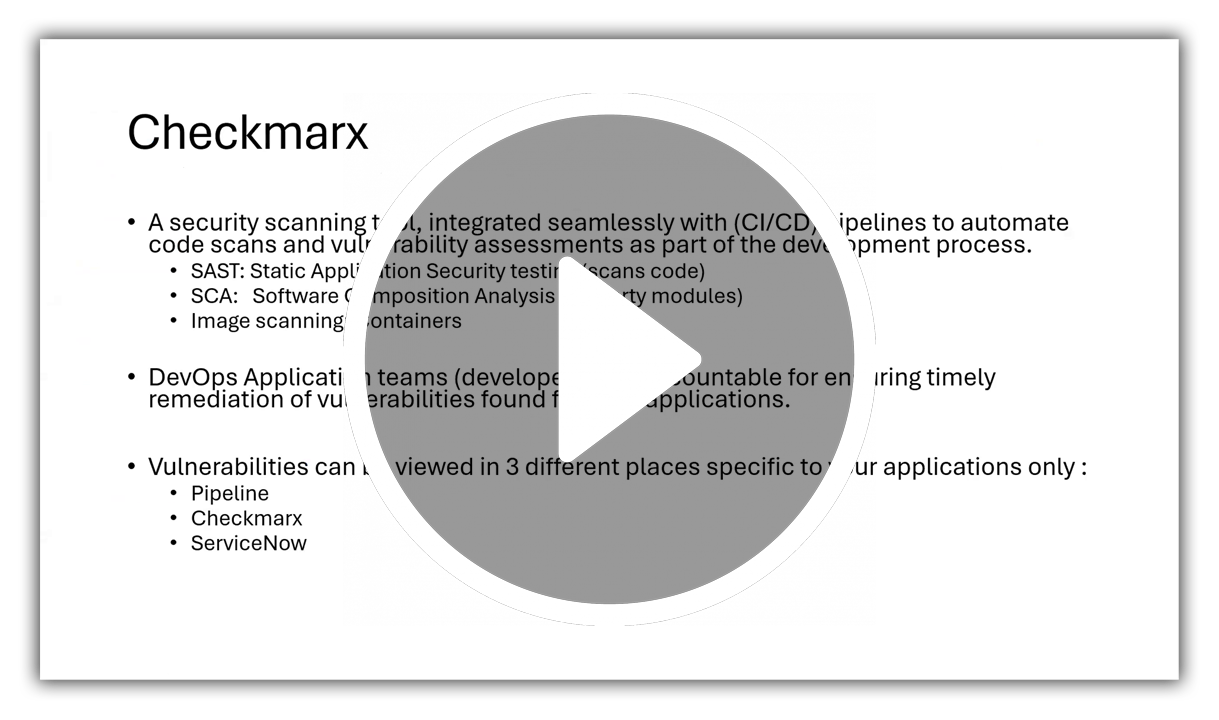
The following Checkmarx training video provides a detailed exploration of key topics, including an overview of Checkmarx, integration with pipelines, authentication processes, vulnerability assessment techniques, and pipeline blocking mechanisms. Join us to enhance your understanding of Checkmarx and fortify your application security practices.
Contact
If you run into any issues or have questions, please open an INC ticket assigned to ITSO > CloudOne DevOps L3
FAQ
Q: Why are we starting to block pipelines with unresolved vulnerabilities?
Protecting NetApp systems and infrastructure from ongoing security threats is a shared responsibility. Checkmarx has been running in "Warning" mode since May 2025 to get developers used to seeing what vulnerabilities exist in their code and to take steps to remediate them. Now that developers have had several months to act on reducing their vulnerabilities, it is time to move to the next phase of the Checkmarx rollout to ensure that we further reduce the number of vulnerable applications deployed in our environment.
Q: The detection date for all vulnerabilities will be reset on Aug 21, 2025. What does that mean?
Part of the enforcement phase of the Checkmarx rollout includes creating ServiceNow Vulnerability tickets when critical and high vulnerabilities are detected during weekly runtime scans. Since this enforcement phase is beginning on Aug 21, 2025, we need to use that date as the baseline to give developers ample time to remediate existing vulnerabilities.
Q: What's the earliest date that my pipeline might get blocked?
Unresolved critical vulnerabilities must be resolved within 30 days, while unresolved high vulnerabilities must be resolved within 60 days. That means Sept 20, 2025 would be the first date that a pipeline would be blocked due to unresolved critical vulnerabilities.
Q: Will my application stop running if my pipeline is blocked?
No! The blocking only applies to NEW production deployments. That said, if a new deployment is necessary to keep an application running, vulnerabilities will need to be remediated or have an approved exception in place to allow the pipeline to proceed.
Q: What if the critical and/or high vulnerabilities detected aren't exploitable?
Follow the process outlined in our documentation to propose that a vulnerability is not exploitable, which requires team lead approval. If approved, the vulnerability will be excluded when evaluating if a pipeline should be blocked.
Q: I have an important deployment coming up and won't be able to remediate the critical or high vulnerabilities in time. What do I do?
Follow the process in our documentation to request an application exception. (Requires VP approval) An approved exception will be valid for a maximum of 90 days to prevent abuse of the exception process.
Q: I still have questions or concerns about this process. Who can I contact?
Send an email to ng-it-devexp@netapp.com and a member of the Development Platform Engineering team will work with you to address your concerns.