React.js
ReactJS Application Stack
The ReactJS application stack is used to build and deploy Web applications in the ReactJS framework and produce deployment-ready containers for the SCALE environment.
The containers produced in this application stack share common requirements with other application stacks deployed to the SCALE environment. These shared requirements include:
- Security scanning for any vulnerabilities
- Code coverage scanning for test quality
- Staging of the application container in the appropriate Docker container repositories and tagged according to SCALE conventions
- Completion of Unit Testing and User Acceptance Testing
- Gated approvals before allowing deployments into pre-production and production environments
- Audit trail and history of deployment within the SCALE CI/CD Pipeline
Because of the above-listed requirements, the ReactJS application stack is provided in order to support the build and deployment of Java/ReactJS applications in a manner that integrates with SCALE requirements and processes. The flow of deployment includes first a Continuous Integration stage of processing in a pipeline prior to deployment in the Continuous Deployment stages. The Continuous Integration stage focuses on building the application, running scans to check for test coverage and security vulnerabilities, and staging the container in the appropriate Docker repository ready for deployment. Subsequent pipeline stages deploy the application to the appropriate target Kubernetes spaces.
For details on getting started, see getting started.
For details on repository structure, see repository structure.
The source directory will contain a package.json file for configuring and building the application. The src sub-directory contains the source code of the application itself. The manifests directory contains Kustomize manifests if Kustomize overlay files are used as an alternative to Helm charts.
For details on application configuration, see application configuration.
For details on CI/CD pipelines, see CI/CD pipelines.
Upgrading to Pipeline v4.7
For details on upgrading to Pipeline v4.7, see upgrading to Pipeline v4.7.
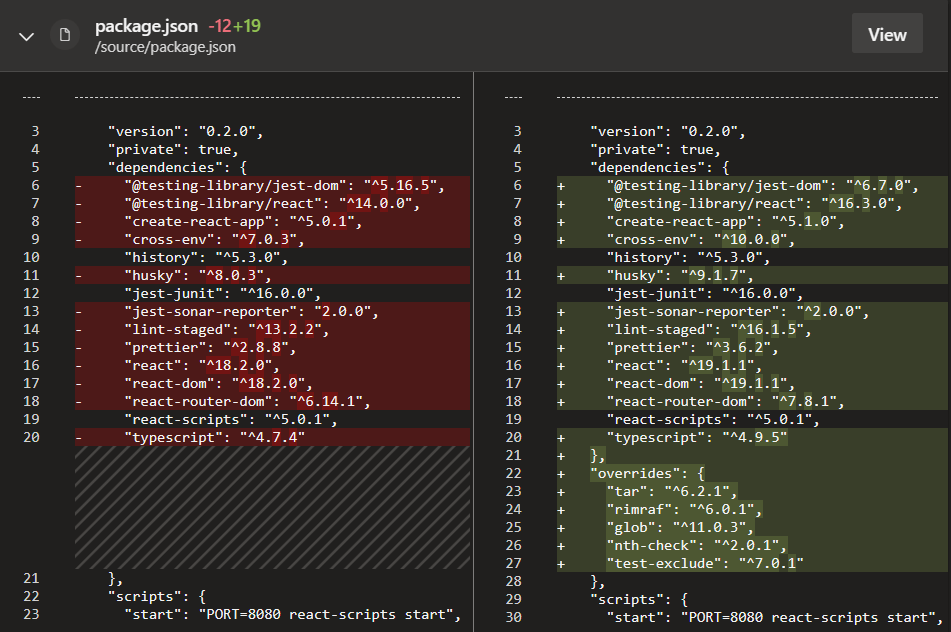
After upgrading, update the necessary packages in your package.json. Keep in mind that once you update your package.json, you will need to run npm install to re-generate your package-lock.json. Here is a screenshot of the changes we made to our template. If you have added modules, you may need to update those as well and/or make sure they are compatible with the packages we have included below:
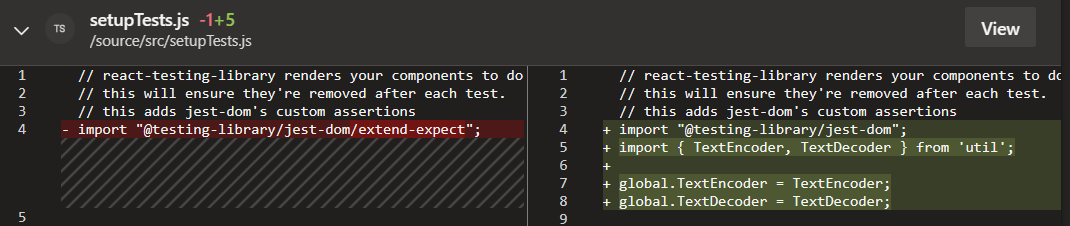
Make any necessary changes to your tests and/or code. You can see the changes we made to the setupTests.js in our template:
After making these changes do a fresh npm install and you're good to go!
For details on pipeline definition, see pipeline definition.
Application-Specific Pipeline Configuration
The extends YAML object is a complex object consisting of additional YAML objects. This object is used to extend the pipeline logic (referenced by the repository defined in the resources object) by (a) referencing the correct appstack pipeline entry point (devops/reactjs.yml for the reactjs pipeline) and (b) passing a set of YAML objects as parameters to influence the behavior of the pipeline to meet an application teams specific needs.
The extends YAML object consists of 2 objects beneath it:
- template
- parameters
The template YAML object is a single value set to the initial entry point for the v4.7 pipeline for the reactjs appstack, so it should always be defined as follows:
extends:
  template: devops/reactjs.yml@spaces
Please refer to upgrade document to know more about reactjs.yml@templates which holds required metadata for the pipeline.
The parameters YAML object is defined immediately following the template object and at the same indentation level. This is the object that requires the most attention and definition to be set up. The parameters YAML object includes multiple parameters which can be used to configure CI/CD pipeline. Primarily this object contains parameters used for application builds. A typical setting in here would be to define appVersion used to build the application, looking like the following (including all of the extends object preceding it):
extends:
  template: pipeline/reactjs/init.yml@templates
  parameters:
    appVersion: 4.7.x
    nodejs:
      version: "18"
For details on Horizontal Pod Autoscaler, see Horizontal Pod Autoscaler.
For details on PVC for application stacks, see PVC for application stacks.
DR changes
With the introduction of pipeline v4.7, we have implemented DR capabilities that require changes in the Helm chart. Please refer to the document below for the necessary modifications and kindly update your Helm chart accordingly.
Please refer to the following document to prepare your codebase for disaster recovery.
DR Config Map and Ingress Setup
For details on Pod Anti-Affinity, see Pod Anti-Affinity.
For details on detailed pipeline configuration, see detailed pipeline configuration.
For details on Kubernetes deployment objects, see Kubernetes deployment objects.
For details on defining hostspaces, see defining hostspaces.
For details on skipping deployments, see skipping deployments.
Update nginx configuration file
As part of SCALE pipeline releases, we keep update base images that we provide for each application stack. Each newer version of base image may have latest configurations supported. Post upgrade, please refer Configuration Details, compare and update newer configurations into your repository.
For details on troubleshooting, see troubleshooting.