VM Operation History
The IaaS Portal tracks every operation (power, resize, tag updates, etc.) submitted for a VM and provides a full history with job status and success/failure details.
To view the operation history for a VM, log into the IaaS Portal and navigate to IaaS --> VM Management at the top. Find your VM in the list and click on it to open the VM detail page. Click the Operation History button in the top-right area of the page.
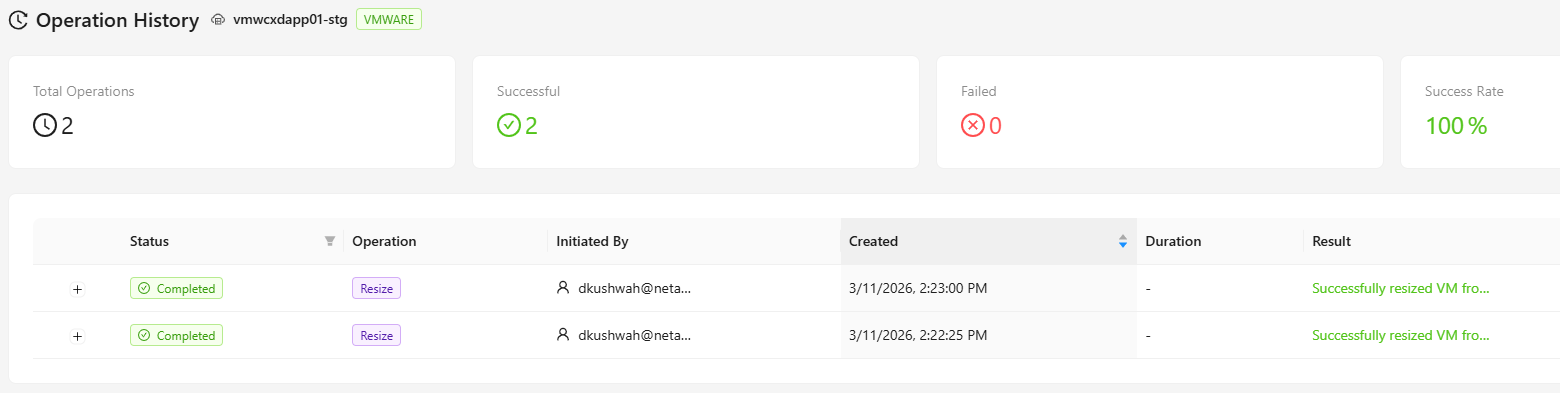
The Operation History page displays:
- Total Operations - Total number of operations submitted for the VM.
- Successful - Number of operations that completed successfully.
- Failed - Number of operations that failed.
- Success Rate - Percentage of operations that succeeded.
Below the summary cards, a table lists each individual operation with its job ID, operation type, status, submitted-by user, and timestamps.
If any jobs are still pending or running, the page will automatically refresh every 20 seconds to reflect the latest status.
You can also manually click the Refresh button at any time to sync and update the status of any in-progress jobs. Click Back to VM Details to return to the VM detail page.