VM Power Operations
You may start/stop/restart your VM using the IaaS Portal. Depending on whether your VM is in VMware (on-prem), AWS, OCI, or Azure, the Portal automation will issue a native call to the appropriate Provider.
- For Stop/Restart operations, the automation will attempt a graceful Operating System Stop/Restart first before proceeding with a hard Stop/Restart if the Operating System does not respond in time.
- The new Power Status will be reflected in the IaaS Portal.
To perform a VM Power Operation, log into the IaaS Portal and navigate to IaaS --> VM Management at the top. Find your VM in the list and select the appropriate icon/action to the right of the VM.
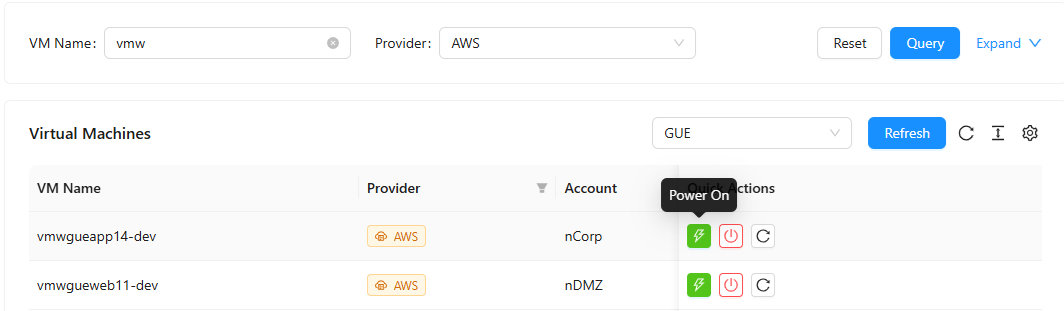
You will see a confirmation dialog box pop-up. Click "Ok" to proceed with the desired operation.
Bulk Power Operations
You can perform a power operation on multiple VMs at once from the VM Management table.
- Select one or more VMs using the checkboxes on the left side of the table. The number of selected VMs is shown in the alert bar that appears above the table.
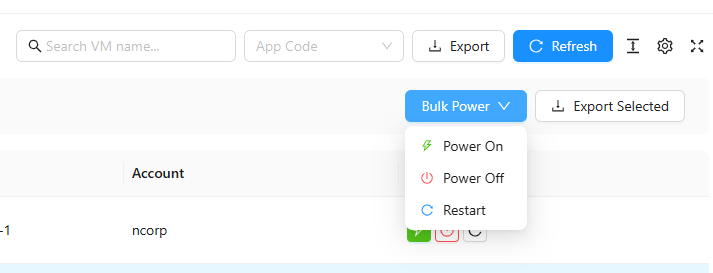
- Click the Bulk Power dropdown button that appears in the alert bar.
- Choose the desired action - Power On, Power Off, or Restart.
- A confirmation dialog will appear listing all eligible VMs that will be affected. If any selected VMs are ineligible for the chosen action (due to missing permissions), those VMs are shown as skipped with a warning.
- Click OK to submit the operations.
Each VM's operation is submitted as an independent job. After submission, a summary message shows how many operations were submitted successfully and how many failed.
To deselect all VMs, click the Clear link in the selection alert bar.
Only VMs you have permission to operate on will be included in a bulk action. VMs you cannot act on are automatically skipped - they are not counted as failures.